Thứ Hai, 22 tháng 4, 2019

Tạo cơ sở dữ liệu SQL theo lập trình

Tạo cơ sở dữ liệu SQL theo lập trình


Trong bài viết này, tôi sẽ giải thích cách sử dụng Microsoft SQL Management Object (SMO) để tạo cơ sở dữ liệu Microsoft SQL từ mã C #.
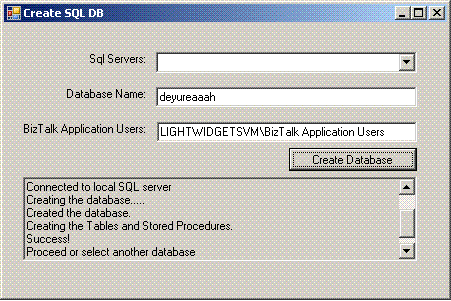
Hình ảnh 1 để tạo cơ sở dữ liệu SQL theo lập trình

Giới thiệu

Trong bài viết này, tôi sẽ giải thích cách sử dụng Microsoft SQL Management Object (SMO) để tạo cơ sở dữ liệu Microsoft SQL từ mã C #. Trong mẫu này, tôi sẽ:
  1. Liệt kê tất cả các máy chủ SQL trong mạng và điền vào hộp danh sách nơi người dùng có thể chọn một trong các máy chủ.
  2. Người dùng sẽ nhập Tên cơ sở dữ liệu để tạo.
  3. Người dùng sẽ nhập tài khoản AD để cấp quyền.
  4. Khi người dùng nhấp vào "Tạo cơ sở dữ liệu", hệ thống sẽ kiểm tra sự tồn tại của cơ sở dữ liệu.

Lý lịch

Đối tượng quản lý máy chủ SQL (SMO) là các đối tượng được thiết kế để quản lý theo chương trình của Microsoft SQL Server. Bạn có thể sử dụng SMO để xây dựng các ứng dụng quản lý SQL Server tùy chỉnh. Mặc dù SQL Server Management Studio là một ứng dụng mạnh mẽ và rộng rãi để quản lý SQL Server, nhưng có thể đôi khi bạn sẽ được ứng dụng SMO phục vụ tốt hơn.

Liệt kê các máy chủ SQL

Các SmoApplication.EnumAvailableSqlServers()liệt kê một danh sách các trường hợp có sẵn của Microsoft SQL Server. Nó trả về một DataTable giá trị đối tượng chứa danh sách thông tin được liệt kê về các phiên bản có sẵn của SQL Server. Bảng mô tả các cột khác nhau của trả lại DataTable.
CộtLoại dữ liệuSự miêu tả
NameStringTên của thể hiện của SQL Server.
ServerStringTên của máy chủ mà phiên bản SQL Server được cài đặt.
InstanceStringVí dụ của SQL Server.
IsClusteredBooleanGiá trị Boolean là true nếu thể hiện đang tham gia phân cụm chuyển đổi dự phòng hoặc false nếu không.
VersionStringPhiên bản của phiên bản SQL Server.
IsLocalBooleanGiá trị Boolean là true nếu thể hiện là cục bộ hoặc false nếu thể hiện ở xa.
DataTable dt = SmoApplication.EnumAvailableSqlServers();
foreach (DataRow dr in dt.Rows)
{ 
this.cbServers.Items.Add(dr[0]);
} 

Kết nối với máy chủ SSQL

Trước tiên, chúng tôi kiểm tra xem người dùng đã chọn máy chủ cục bộ hay máy chủ SQL:
//Connect to the local, default instance of SQL Server.
string srvname = this.cbServers.SelectedItem as string;
Server srv;
if (srvname == null)
{
    srv = new Server();
    sb.AppendLine("Connected to local SQL server");
}
else 
{
    srv = new Server(srvname);
    sb.AppendLine(string.Format("Connected to {0}", srvname));
}

Kiểm tra nếu cơ sở dữ liệu tồn tại

Thật dễ dàng để kiểm tra xem cơ sở dữ liệu đã tồn tại hay chưa, chỉ cần sử dụng Databases thuộc tính của máy chủ như sau:
//Define a Database object variable by supplying the server and the 
//database name arguments in the constructor. 
Database db = srv.Databases[this.tbDBName.Text.Trim()];
if (db != null)
{
    if (MessageBox.Show(string.Format
 ("The '{0}' already exists do you want to drop it?", this.tbDBName.Text), 
 "Warning", MessageBoxButtons.YesNo, 
 MessageBoxIcon.Question) == DialogResult.Yes)else 
    {
        if (MessageBox.Show(string.Format
 ("Create the Tables and Stored Procedures for BT Error Manager on '{0}'?", 
 this.tbDBName.Text), "Warning", MessageBoxButtons.YesNo, 
 MessageBoxIcon.Question) == DialogResult.Yes)
        {
            b.AppendLine("Creating the Tables and Stored Procedures.");
            this.tbProgress.Text = sb.ToString();
            db.ExecuteNonQuery(dbstring);
            sb.AppendLine(string.Format
    ("Created the Tables and Stored Procedures for BT Error Manager on '{0}'", 
    this.tbDBName.Text));this.tbProgress.Text = sb.ToString();
    this.tbProgress.ScrollToCaret();"Proceed or select another database");
    this.tbProgress.Text = sb.ToString();this.tbProgress.ScrollToCaret();
            return; 

Tạo cơ sở dữ liệu

Để tạo cơ sở dữ liệu, tất cả những gì bạn phải làm là tạo một Database đối tượng mới với Máy chủ và tên của cơ sở dữ liệu, sau đó gọi Create phương thức.
db = new Database(srv, this.tbDBName.Text);
this.tbProgress.Text = sb.ToString();
this.tbProgress.ScrollToCaret();
//Create the database on the instance of SQL Server. 
db.Create();
sb.AppendLine("Created the database.");
sb.AppendLine("Creating the Tables and Stored Procedures.");
this.tbProgress.Text = sb.ToString();this.tbProgress.ScrollToCaret(); 

Chạy tập lệnh SQL

Bước cuối cùng là chạy tập lệnh sẽ tạo các bảng, dạng xem, thủ tục được lưu trữ, v.v.
//'Reference the database and display the date when it was created. 
db.ExecuteNonQuery(dbstring);

Ghi chú

Nếu bạn muốn sử dụng mã này trong dự án của mình, bạn sẽ cần thêm các tham chiếu đến các hội đồng SMO. Bạn có thể định vị các cụm SMO trong thư mục C: \ Program Files \ Microsoft SQL Server \ 90 \ SDK \ Assemblies . Chọn các tệp sau:
  • Microsoft.SqlServer.ConnectionInfo.dll
  • Microsoft.SqlServer.Smo.dll
  • Microsoft.SqlServer.SqlEnum.dll
  • Microsoft.SqlServer.SmoEnum.dll
}
sb.AppendLine(
}
}
{
    db.Drop();
}

Lịch sử

Truy cập www.MoustafaRefaat.com để tìm thêm thông tin.

Blog đoạn trích C # & ASP .NET

Đóng MessageBox sau vài giây


Hãy thử cách tiếp cận sau:
AutoClosingMessageBox.Show("Text", "Caption", 1000);
Trường hợp  AutoClosingMessageBox lớp thực hiện như sau:
public class AutoClosingMessageBox {
    System.Threading.Timer _timeoutTimer;
    string _caption;
    AutoClosingMessageBox(string text, string caption, int timeout) {
        _caption = caption;
        _timeoutTimer = new System.Threading.Timer(OnTimerElapsed,
            null, timeout, System.Threading.Timeout.Infinite);
        MessageBox.Show(text, caption);
    }
    public static void Show(string text, string caption, int timeout) {
        new AutoClosingMessageBox(text, caption, timeout);
    }
    void OnTimerElapsed(object state) {
        IntPtr mbWnd = FindWindow(null, _caption);
        if(mbWnd != IntPtr.Zero)
            SendMessage(mbWnd, WM_CLOSE, IntPtr.Zero, IntPtr.Zero);
        _timeoutTimer.Dispose();
    }
    const int WM_CLOSE = 0x0010;
    [System.Runtime.InteropServices.DllImport("user32.dll", SetLastError = true)]
    static extern IntPtr FindWindow(string lpClassName, string lpWindowName);
    [System.Runtime.InteropServices.DllImport("user32.dll", CharSet = System.Runtime.InteropServices.CharSet.Auto)]
    static extern IntPtr SendMessage(IntPtr hWnd, UInt32 Msg, IntPtr wParam, IntPtr lParam);
}


-------------------------------------------------- -------------------------------------------------- -------------------------------------------------- -------------


Bạn có thể thử điều này:
[DllImport("user32.dll", EntryPoint="FindWindow", SetLastError = true)]
static extern IntPtr FindWindowByCaption(IntPtr ZeroOnly, string lpWindowName);
[DllImport("user32.Dll")]
static extern int PostMessage(IntPtr hWnd, UInt32 msg, int wParam, int lParam);
private const UInt32 WM_CLOSE = 0x0010;
public void ShowAutoClosingMessageBox(string message, string caption)
{
    var timer = new System.Timers.Timer(5000) { AutoReset = false };
    timer.Elapsed += delegate
    {
        IntPtr hWnd = FindWindowByCaption(IntPtr.Zero, caption);
        if (hWnd.ToInt32() != 0) PostMessage(hWnd, WM_CLOSE, 0, 0);
    };
    timer.Enabled = true;
    MessageBox.Show(message, caption);
}


-------------------------------------------------- -------------------------------------------------- -------------------------------------------------- -------------


Nếu bạn không nhớ làm rối các tài liệu tham khảo của mình một chút, bạn có thể bao gồm  Microsoft.Visualbasic, và sử dụng cách rất ngắn này.
Hiển thị MessageBox
    (new System.Threading.Thread(CloseIt)).Start();
    MessageBox.Show("HI");
Chức năng CloseIt:
public void CloseIt()
{
    System.Threading.Thread.Sleep(2000);
    Microsoft.VisualBasic.Interaction.AppActivate( 
         System.Diagnostics.Process.GetCurrentProcess().Id);
    System.Windows.Forms.SendKeys.SendWait(" ");
}
Bây giờ đi rửa tay!


-------------------------------------------------- -------------------------------------------------- -------------------------------------------------- -------------


 Phương thức System.Windows.MessageBox.Show () có tình trạng quá tải, lấy một cửa sổ chủ sở hữu làm tham số đầu tiên. Nếu chúng ta tạo một Cửa sổ chủ sở hữu vô hình mà sau đó chúng ta sẽ đóng sau một thời gian xác định, hộp thông báo con cũng sẽ đóng.
Window owner = CreateAutoCloseWindow(dialogTimeout);
MessageBoxResult result = MessageBox.Show(owner, ...
Càng xa càng tốt. Nhưng làm thế nào để chúng ta đóng một cửa sổ nếu luồng UI bị chặn bởi hộp thông báo và các điều khiển UI không thể được truy cập từ một luồng công nhân? Câu trả lời là - bằng cách gửi thông báo cửa sổ WM_CLOSE đến tay cầm cửa sổ chủ sở hữu:
Window CreateAutoCloseWindow(TimeSpan timeout)
{
    Window window = new Window()
    {
        WindowStyle = WindowStyle.None,
        WindowState = System.Windows.WindowState.Maximized,
        Background =  System.Windows.Media.Brushes.Transparent, 
        AllowsTransparency = true,
        ShowInTaskbar = false,
        ShowActivated = true,
        Topmost = true
    };

    window.Show();

    IntPtr handle = new WindowInteropHelper(window).Handle;

    Task.Delay((int)timeout.TotalMilliseconds).ContinueWith(
        t => NativeMethods.SendMessage(handle, 0x10 /*WM_CLOSE*/, IntPtr.Zero, IntPtr.Zero));

    return window;
}
Và đây là cách nhập cho phương thức API SendMessage:
static class NativeMethods
{
    [DllImport("user32.dll", CharSet = CharSet.Auto)]
    public static extern IntPtr SendMessage(IntPtr hWnd, UInt32 Msg, IntPtr wParam, IntPtr lParam);
}


-------------------------------------------------- -------------------------------------------------- -------------------------------------------------- -------------


Một giải pháp hoạt động trong WinForms:
var w = new Form() { Size = new Size(0, 0) };
Task.Delay(TimeSpan.FromSeconds(10))
    .ContinueWith((t) => w.Close(), TaskScheduler.FromCurrentSynchronizationContext());
MessageBox.Show(w, message, caption);
Dựa trên hiệu ứng đóng biểu mẫu sở hữu hộp thông báo cũng sẽ đóng hộp.
Các điều khiển Windows Forms có một yêu cầu là chúng phải được truy cập trên cùng một luồng đã tạo ra chúng. Việc sử dụng  TaskScheduler.FromCurrentSynchronizationContext() sẽ đảm bảo rằng, giả sử rằng mã ví dụ ở trên được thực thi trên luồng UI hoặc luồng do người dùng tạo. Ví dụ sẽ không hoạt động chính xác nếu mã được thực thi trên một luồng từ nhóm luồng (ví dụ: gọi lại bộ đếm thời gian) hoặc nhóm tác vụ (ví dụ: trên một tác vụ được tạo bằng  TaskFactory.StartNew hoặc  Task.Run với các tham số mặc định).